My Blinkies


Stuff


Designers I CT for


Blogs I support

CU Licenses I hold


Networked Blog

Blogroll
-
-
Still around and still busy2 weeks ago
-
Midnight Garden Blog Train Freebie!3 weeks ago
-
Dayz of Summer - Tagger10 months ago
-
-
Country Christmas 20202 years ago
-
Blessed2 years ago
-
-
-
StellaFelice7 Taggies6 years ago
-
February 2020 New Releases6 years ago
-
-
MB&SW Masks 126 and 1276 years ago
-
MASKS #21 and 227 years ago
-
-
CA Girl Exclusive - kit8 years ago
-
-
-
PTU KIT SUMMER CITRUS10 years ago
-
STORE CLOSING DOWN SALE11 years ago
-
Gothic Ashley CT Results11 years ago
-
Rocking Shamrocks11 years ago
-
HELLO AND HAPPY NEW YEAR11 years ago
-
-
Glorious Autumn11 years ago
-
Announcement12 years ago
-
4 New Animations12 years ago
-
New Packs/Kits up in Zone Store ..12 years ago
-
New kit!! "Girlie Girl"12 years ago
-
***Dnscraps, Little Crown***12 years ago
-
"Hope for Brady" 2013 Blog Train!13 years ago
-
Lucky Me - Tagger Size13 years ago
-
Sweet Love PTU13 years ago
-
sassandswagtemps13 years ago
-
CT Tag and New Template13 years ago
-
Serg Grafik satc “All You Need is Love”13 years ago
-
Sexy Biker Babe - Kit By NAC13 years ago
-
Pirates Wanted - tag13 years ago
-
SWA is Re-Opening !14 years ago
-
Blogwear Design TOU14 years ago
-
-
♥Miraculous Moment♥15 years ago
-
-
-
-
-
-
-
-
-
-


Thursday, June 12, 2014
CT Tag show off... Wicked Princess Scraps ~~ Tasha's Playground ~~
Tasha's Playground is a gorgeously awesome kit from Wicked Princess Scraps.
This kit is chocked full of fun and fabulousness to play with. You can run and grab it here for fab creations to celebrate the Spring and Summer. As you can see it works great for boys and girls, so think of the quick pages you could make with this!! Happy PSPing!


Wednesday, May 14, 2014
Funshiny Day Quick page
Funshiny Day from Thrifty Scraps by Gina is a fabulously fun kit that you can find at Scrap Bird.

You can download the quick page here.
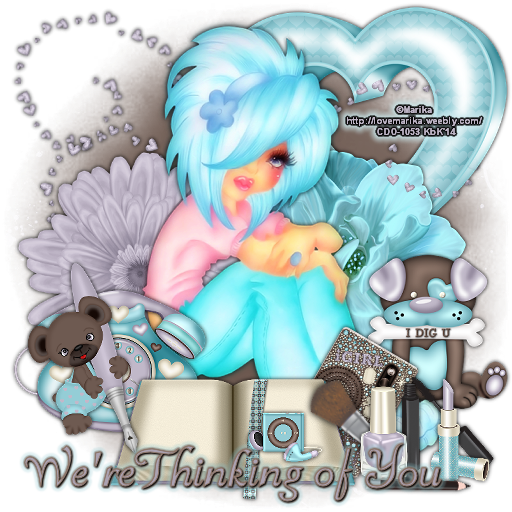
CT Show off ~~ Soxie's World ~~ snags
These snags were made using Wicked Princess Scraps Soxie's world.


Thursday, March 6, 2014
A Rose for Bunny quick page

A Rose for Bunny is a fabulous Spring kit from Thrifty Scraps by Gina.
This will make a bright fun page or tags go pick it up today!
You can snag this quick page here.
Tuesday, February 25, 2014
Music Man quick page from Music Man PTU scrap kit from Thrifty Scraps by Gina

This fun and fabulous kit from Thrifty Scraps by Gina, Music Man, makes a great quick page and is FUN!!!!
Saturday, February 22, 2014
Sail Away with Me quick page

Summer is approaching slowly but this fab scrap kit, Sail Away With Me from Thrifty Scraps by Gina, makes it a great way to bring it a bit sooner.
Grab this quick page to help save your Summer memories.
Just Peachy Snags featuring VeryMany and blog layout featuring Pin Up Toons Plus a Quick page


Just Peachy is a "peach" of a kit from A Simply Sassy Scrap Creation. You can grab these snags or the blog template below.

Plus because I love this kit so much, here is a quick page you can grab, here is a sample featuring my fur baby.

Thursday, February 20, 2014
Pink Milkshake from Thrifty Scraps by Gina quick page and blog layout

Or you can grab the blog layout below and make a change to your blog for spring.
This fab kit has so much to offer, you can't fail with this purchase.

You can see I love this kit since I used it on my blog, and my new signature.
Enjoy!!

Thursday, February 13, 2014
Neenja Master snags featuring KiwiFireStorm


The fabulous Neenja Master Kit by Wicked Princess Scraps along with the fab tube VE Samurai can be found at the PSP project in a great bundle.
Monday, February 3, 2014
Zombie Kind of Love Snags by Wicked Princess Scraps


The fabulous kit Zombie Kind of Love, Wicked Princess Scraps puts a fun twist on love, especially for zombie lovers.
You can find it here.
If you'd like to snag the freebies, simply right click on the image and save.
Sunday, February 2, 2014
Golden Heart CT Show off with Stat

The wonderfully versatile kit Golden Heart can be found at Zindy Zone Store.
Here is a stat made with the same kit,

you can download it here.
CT tag show off with an IM stat


Tuesday, December 3, 2013
Fabulous Kits from CBJ Scraps Tag Show off
Check out these fabulous kits over at Zindy's store.
Check out these and so many other AWESOME kits, something for everyone.


Monday, December 2, 2013
Emolution Party snags
Here are some snags I made using the fabulous Emolution Party kit by Wicked Princess Scraps.
You can check out her blog to find where to get this awesome kit!!


Sunday, November 24, 2013
Dream Sweet featuring I Love Candy an KiwiFireStorm

This tutorial was written entirely by me, using PSP9, any resemblance to any other is purely coincidental.
This tutorial should work with any version of PSP.
This tutorial is written with the belief that you have a working knowledge of PSP, but is also suitable for beginners.
Materials you will need:
Scrap Kit of choice, I used I love Candy by Wicked Princess Scraps.
Tube of choice, I used the art of ©KiwiFireStorm which requires a license which may be purchased at TPP.
Mask of choice, I used , KBH_2012_Mask6 and you may get it here.
Font of choice, I used Blairesque Curly JF.
Filters:
Xero ~ Porcelain
MuRa's Meister ~ Copies
Alien Skin Eye Candy 6 ~ Gradient Glow
Let's begin.
Open a new image, 750x750, you will re-size later.
Copy and paste a paper from your kit into your new image.
Apply a Gaussian blur of 10 to the paper. (Adjust, Blur, Gaussian Blur)
Apply your mask: Layers, Load/Save Mask, Load mask from Disk.
Merge group: Layers, Merge, Merge Group.
Duplicate, add another Gaussian Blur of 4 and change properties to Overlay.
Now place your tube as a new layer, and re-size as needed.
Add a Drop shadow of choice, I used 0,0,100,10.
Apply Porcelain with these settings:

Duplicate the tube layer and add a Gaussian Blur of 4.
Change the layer properties to overlay.
You should play with the properties and Porcelain settings until you reach something you like, or you can stick with my settings.
Using one of the candy elements from your kit and apply Copies with these settings:

Duplicate, mirror and repeat Filter settings until you achieve the desired result.
Apply your drop shadow of choice if desired.
Begin placing more elements from your kit around your tube as desired.
Add Drop Shadow and Gradient Glow as desired to elements.
Or you can duplicate and add a Gaussian Blur to achieve some different effects.
Gradient Glow Settings used on some elements such as the Cake:

Re-size, rotate and mirror elements as desired to create a tag unique to you.
Have fun with it.
Re-size tag, add your name and you have completed my tutorial.
Monday, June 3, 2013
New Cluster freebie featuring cheyOkota Sraps

This kit Sand and Sea by cheyOkota Digital Scraps is a great way to decorate your memories for scrap booking fans, and it makes fun tags for taggers.
Grab it and have some summer fun.

Sunday, June 2, 2013
Divine Nostalgia Featuring Divine Beauty and Barbara Jensen

This tutorial was written entirely by me, using PSP9, any resemblance to any other is purely coincidental.
This tutorial should work with any version of PSP.
This tutorial is written with the belief that you have a working knowledge of PSP, but is also suitable for beginners.
Materials you will need:
Scrap Kit of choice, I used Devine Beauty by Wicked Princess Scraps.
Tube of choice, I used the art of ©Barbara Jensen which requires a license which may be purchased at her store.
Mask of choice, I used Mask179, and I'm not sure where I got it but if this is your work, please contact me so I can credit you.
Font of choice, I used Belluccia Stylistic.
Filter:
Xero ~ Porcelain
Xero ~ Nostalgia
Let's begin.
Open a new image, 750x750, You will re-size later.
Copy and paste a paper into your image and apply your mask, Layers, Load/Save Mask, Load Mask From Disk.
Merge group, Layers, Merge, Merge group.
Begin placing some of your elements if you are using my tag as a guide Start with your clock element re-sized 75,
change Properties to Color (Legacy) Position as desired.
Place your key element and adjust the properties to Soft Light.
You may add a drop shadow to your elements as desired. I used 0,0,100,10.
Using one of the charm elements Apply your mask to the layer first then merge the group then apply your mask to the canvas and merge group.
Duplicate this layer on first copy of the layer change properties to Color (Legacy),
on the second copy change properties to screen then merge down.
Change the properties to Difference. If you need to adjust the color a bit you can use the Manual Color Corrector.
Place your tube and add the drop shadow of choice. Duplicate.
Move duplicate layer beneath the original tube layer and apply your mask to canvas.
Using your erase tool on the original layer erase bits for a smooth blend with the layer beneath.
Merge down and re-name layer Tube (if you want to make it easy to find the tube layer).
Duplicate the tube layer twice.
On the original layer apply porcelain with these settings:
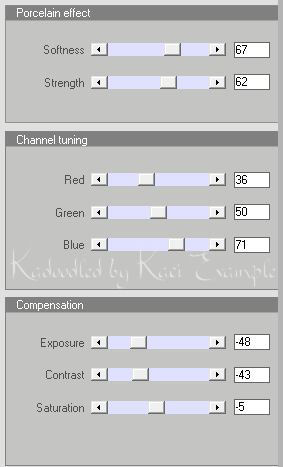
On the layer closest to the original layer Color the tube to a color in your kit and adjust properties to Saturation (Legacy).
Adjust the transparency to 60 or that of your choice.
On the top tube layer add a Gaussian Blur of 7 (Adjust, Blur, Gaussian Blur) then adjust the properties to Overlay.
Place other elements of choice as desired.
If you are using my tag as a guide I chose one of the flower elements re-sized 75 and apply Porcelain with these settings:

I re-sized the bottle and the jeweled envelope as needed to suit me.
On the Jewelry box I applied Nostalgia with these settings:

Now re-size your tag, add your copyright and your name.
You have now completed my tutorial.
Thanks for giving it a try.
Here is another set of extras using this fabulous kit .


Subscribe to:
Posts
(Atom)

Licenses I hold


CLOSED STORES:


Counter
|


